Our Short List of 3
All 4 Picks at a Glance
| Product | Specs | Action |
|---|---|---|
 Ring Battery Doorbell, 2024 release (B0BZWRSRWV) | Check price on Amazon | |
 Blink Video Doorbell with Sync Module Core (B0DGQZ8JZK) | Check price on Amazon | |
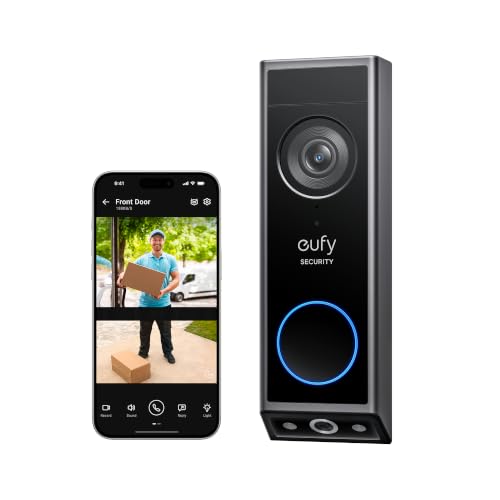 eufy Video Doorbell E340 (B0CD7NT4Y9) | Check price on Amazon | |
 Arlo Video Doorbell 2K, 2nd generation (B0C683F516) | Check price on Amazon |
Key takeaways
- Four wireless battery doorbell cameras compared on video quality, battery life, storage choices and app experience, with install notes for homes without wiring.
A wireless doorbell camera is the easiest security upgrade a home can get. There is no transformer to upgrade and no wiring to run: the doorbell charges like a phone, mounts with a couple of screws, and starts watching the doorstep the same afternoon. The four models below are the established battery doorbells still sold new on Amazon US. They differ in video sharpness, how they store recordings, and how much ongoing attention they demand, so this guide explains those differences before the picks themselves.
What to look for in a wireless doorbell
Battery life and charging. Manufacturers quote battery life in months, but real life depends on how busy your doorstep is. A quiet suburban door might go a season between charges; a busy city entrance can drain a battery in weeks. Models with a removable battery pack are the most convenient, since a charged spare swaps in within a minute. Some can also trickle-charge from existing doorbell wiring if you later choose to connect it.
Video quality and field of view. Resolution matters less than the shape of the picture. A tall, head-to-toe view shows packages left directly under the doorbell, which a wide but short view can miss. Night vision range and HDR handling decide whether a backlit face at noon is recognisable or a silhouette.
Storage: subscription or local. This is the biggest long-term difference between brands. Some doorbells record to the cloud only through a paid plan, while others store clips on a hub or memory card inside the house with no plan required. Neither approach is wrong, but you should choose deliberately, because switching ecosystems later means replacing hardware.
Alerts and detection. Person and package detection cut the flood of useless motion alerts from passing cars and swaying branches. Check which detection features are included free and which sit behind a plan.
Installation: what the afternoon actually involves
Fitting a battery doorbell is genuinely simple, but a few decisions shape how well it works. Start with height and angle: mounting around chest height with the included wedge angled toward the approach path gives faces rather than the tops of heads. Next, check the Wi-Fi signal at the door with your phone before drilling anything, because a doorbell at the edge of router range will drain its battery reconnecting and deliver late alerts. If the signal is weak, a mesh node or extender near the front of the house fixes the doorbell and usually a bedroom or two as well. Renters and anyone avoiding screws can use a no-drill anti-theft mount that clamps over the door itself; all four brands here fit generic mounts of that style. Finally, walk the approach at day and night after fitting, and use the app’s motion zones to exclude the street, so the battery is spent on visitors rather than traffic.
Privacy and courtesy settings that matter
A doorbell camera watches a semi-public space, and the settings deserve five minutes of attention. Motion zones and person detection keep recordings focused on your own property. Audio recording rules vary by state, and some jurisdictions treat conversations differently from video, so check local guidance if you plan to keep audio enabled. Most apps here let you set privacy zones that black out a neighbour’s window or doorway, which is both courteous and, in some places, legally required. If your doorbell overlooks a shared apartment corridor, a conversation with the building manager before fitting avoids the most common dispute these devices cause. None of this is complicated, but handling it at installation is far easier than after a complaint.
Ongoing costs, explained honestly
The doorbell itself is a one-time purchase, but video history is where brands differ. Ring and Arlo keep recordings in their cloud services, and looking back beyond live view requires their subscription plans, which are charged per device or per home depending on the tier. Blink gives a choice between its cloud plan and local storage on the Sync Module with a USB drive. eufy’s local storage on the device or a HomeBase avoids a plan for recordings entirely. None of these arrangements is hidden, but they are easy to overlook when comparing headline prices, so decide which model you prefer before choosing the hardware, because the doorbell and its storage ecosystem come as a package.
The picks
Ring Battery Doorbell, 2024 release (B0BZWRSRWV)
Ring’s current battery doorbell is the default choice for most homes. It records in HD with a tall head-to-toe view that captures packages on the step, includes colour night vision, and pairs with the deepest accessory and smart-home ecosystem in the category, including Alexa routines and a wide range of chimes. The removable battery charges over USB. Video history lives in Ring’s cloud plans, so budget for the subscription if you want to look back at clips rather than only watch live. For households already using Alexa, nothing else integrates as smoothly.
Blink Video Doorbell with Sync Module Core (B0DGQZ8JZK)
Blink’s second-generation doorbell is the long-battery-life pick. Blink quotes up to two years of use from a set of lithium AA cells under typical settings, which makes it the closest thing to fit-and-forget in this group. Video is a tall 1440 by 1440 square view that suits porches well, and the included Sync Module Core enables local clip storage on a USB drive as an alternative to Blink’s cloud plan. The app experience is simpler than Ring’s and the detection features are more basic, but for a straightforward doorbell that rarely asks for attention, it is hard to beat.
eufy Video Doorbell E340 (B0CD7NT4Y9)
The E340 is the no-subscription flagship of the group. It carries two cameras: a forward-facing 2K camera for faces and a downward camera dedicated to packages, a combination nobody else here matches. Recordings store locally on the device or a eufy HomeBase, so there is no plan to buy for video history, and the battery pack is removable for quick swaps. It works with Alexa and Google Assistant. Choose the E340 if the dual-camera package view appeals and you prefer your recordings stored at home.
Arlo Video Doorbell 2K, 2nd generation (B0C683F516)
Arlo’s doorbell emphasises video quality and smart detection. Its 2K HDR sensor with a very wide diagonal view captures faces and packages in a single frame, and Arlo’s detection can distinguish people, packages, vehicles and animals, with the richest alert types in this group. The rechargeable battery is built in, so charging means bringing the doorbell inside or running a cable. Video history requires an Arlo Secure plan. Pick Arlo if alert intelligence and picture quality matter more to you than storage flexibility.
Living with a battery doorbell, month to month
Ownership settles into a rhythm. Most households check the battery level in the app every few weeks and charge when it dips low, a task on the level of watering a plant. Firmware updates arrive through the app and are worth applying, since detection accuracy and battery behaviour both improve over a model’s life. Once a season, wipe the lens and the motion sensor window, because spider webs and dust are the leading cause of false alerts at night. If your door faces strong afternoon sun, expect the battery to age a little faster and alerts to multiply on hot, shimmering driveways; motion zones and reduced sensitivity in the app calm both problems. Finally, if you move house, every model here unmounts in minutes and can be removed from your account and re-registered at the new address, leaving the mounting bracket behind as the only trace.
Two households, two different right answers
Consider two typical buyers. A renter in an apartment block needs permission-friendly fitting, a door view that covers a corridor approach, and no wiring changes on departure day; the Blink with its long-life cells or the Ring on a no-drill mount fit that life, and both leave with the tenant. A homeowner on a busy street needs package detection that actually works, tolerance for heavy daily motion, and storage that does not punish a high event count; the eufy E340’s local storage and second package camera answer that brief directly, with the Arlo as the alternative for those who value alert detail over storage freedom. The point of the comparison sections above is that neither household is wrong; they are shopping for different things under the same product name, and matching the doorbell to the doorway matters more than any single specification.
How to choose
Start with storage: if you refuse subscriptions on principle, the eufy E340 or the Blink with its local-storage module are your two routes. If you already live in the Alexa ecosystem and accept a cloud plan, Ring is the smoothest install. If you want the sharpest picture and the smartest alerts, Arlo earns its plan. Renters should confirm the mounting rules in their lease; all four can also work with no-drill mounts sold for apartment doors, and every model here can later be wired if a home gains doorbell wiring.
Frequently asked questions
Do wireless doorbells work in cold weather? Lithium-based batteries lose capacity in deep cold, so expect shorter intervals between charges in winter. Models with AA lithium cells, like the Blink, tend to shrug off cold better than rechargeable packs.
Can someone steal a battery doorbell? They mount with screws or locking brackets, and every brand here will alert you to motion at the door. A stolen doorbell also records its own removal to the cloud or hub on most models, which discourages the attempt.
Do I need a chime inside the house? Not strictly. All four send phone alerts, and most can ring through an Alexa or Google speaker. A plug-in chime is a worthwhile addition for households that do not keep phones within earshot.
How often will I really charge the battery? Manufacturers quote best-case figures based on a handful of events a day. A quiet door may approach those numbers; a busy family entrance with deliveries and children will charge far more often. If charging access is awkward, the Blink’s multi-year AA cells or a wired trickle connection are the practical answers.
Can I use one of these at an apartment door? Usually, yes. Battery doorbells need no wiring changes, and no-drill mounts avoid screw holes entirely. Check your lease and building rules first, since some properties regulate cameras in shared corridors.
Disclosure: As an Amazon Associate, this site may earn from qualifying purchases made through links in this article, at no additional cost to you.