Key takeaways
- Looking for the best cases for a m itx motherboards? Compare compact mini-ITX cases for airflow, GPU fit, cooling, and easy small builds in this guide.
If you are searching for the best cases for a m itx motherboards, the phrase itself needs a quick translation first. The keyword “a m itx” is a spacing artifact for mini-ITX, the small motherboard form factor that measures 170 by 170 millimetres. This roundup therefore covers PC cases for mini-ITX motherboards, and nothing else. Every case below is made for that compact board size, so you will not find a mid-tower or a full-tower case slipped into the list to fill space.


A mini-ITX build is a trade. You give up extra expansion slots and a roomy interior, and in return you get a computer that can sit on a desk or beside a television without dominating the room. The case decides how pleasant that trade feels. A well-designed mini-ITX case makes cable routing manageable, keeps air moving past hot parts, and still accepts a capable graphics card and a sensible cooler.
The quick answer is to start with the Cooler Master NR200 if you want the most flexible all-round mini-ITX case, choose the Fractal Design Terra if appearance and a small footprint matter most, pick the Thermaltake Core V1 if you want a cube layout with a standard power supply, and consider the SilverStone SG13 if you want the smallest and simplest case in this group.
Quick Picks
Our Short List of 3
All 4 Picks at a Glance
| Product | Specs | Action |
|---|---|---|
| 1. Cooler Master NR200 — Most Flexible All-Round Mini-ITX Case | Check price on Amazon | |
| 2. Fractal Design Terra — Best Compact Mini-ITX Case for Design and Desk Space | Check price on Amazon | |
| 3. Thermaltake Core V1 — Best Cube Mini-ITX Case With a Standard Power Supply | Check price on Amazon | |
 4. SilverStone SG13 — Best Small and Simple Mini-ITX Case | Check price on Amazon |
How to Choose
Start With Motherboard Size, Not Case Size
Mini-ITX is a precise standard, and every case in this guide accepts a mini-ITX motherboard. That shared starting point is useful, but it does not mean every mini-ITX board fits every mini-ITX case in the same way. Some boards have tall heatsinks, a rear-mounted connector layout, or a CPU socket position that sits close to the memory slots or the top edge. Check the board manual for the socket location and the height of any chipset or voltage regulator heatsinks, then compare those details with the case layout. A case with a removable motherboard tray or removable panels makes this check easier, because you can install the board outside the tightest part of the chassis and slide it in with cables already attached.
Also confirm that the case includes the standoffs and mounting hardware for mini-ITX. Most do, but a second-hand case may be missing a standoff or a screw set. Keep the board manual and the case manual side by side during the first dry fit, before any cables are connected.
Measure the Graphics Card in Three Directions
Graphics card length gets most of the attention, and for good reason. A card that is a few millimetres too long simply will not fit. Length alone is not enough, though. Card thickness matters just as much in a mini-ITX case, because a thick card can block fan mounts, crowd the power supply, or press against a side panel. Card height matters too, especially in sandwich-layout cases where the card sits behind the motherboard and the power connectors need clearance at the top or side.
Write down length, thickness in slots, and height for your card, including any factory overhang from the cooler shroud or backplate. Then compare all three numbers with the case specification, not just the headline length figure. Leave a small margin for the power cables, because a connector that bends sharply against a panel can strain the socket over time.
Choose Air Cooling or Liquid Cooling Before You Buy
Cooling choice shapes the whole build. A tower air cooler is simple, reliable, and easy to maintain, but it needs vertical clearance and clear airflow from intake to exhaust. A low-profile air cooler fits in thinner cases, yet it works best when case fans feed it cool air directly. A liquid cooler with a radiator moves heat to the edge of the case, which can help in a tight layout, but the radiator, fan thickness, tubing, and pump head all need their own space.
Decide which route you will take before you order the case. If you choose air cooling, check the maximum CPU cooler height and the position of the cooler relative to the memory and the rear panel. If you choose liquid cooling, check radiator size, radiator thickness, fan placement, and tubing length.
Power Supply Size Is a Hard Limit
Power supply form factor is one of the most common reasons a mini-ITX build stalls. Many compact cases accept only an SFX or SFX-L power supply, which is smaller than a standard ATX unit. Others accept a standard ATX power supply up to a stated length, which gives you more choice but often takes space that could have gone to a longer graphics card or a larger cooler.
Check the exact power supply type and maximum length for the case you are considering, and check the wattage and cable set you need for your processor and graphics card. A modular power supply helps in a small case because you can leave unused cables out of the build entirely. If you already own an ATX power supply, do not assume it will fit a compact case.
Airflow Matters More in a Small Case
In a large case, a weak airflow path can be masked by empty space. In a mini-ITX case, there is no empty space to hide behind. Every fan, vent, and panel gap has a job to do. Look for a clear intake path and a clear exhaust path, and think about where hot air from the graphics card and the processor will go. Mesh panels help when they sit directly over a hot component, while a solid panel can trap heat if it covers the main intake.
Fan size and fan count are part of the picture, but placement matters more than the raw number of fans. A single well-placed intake fan that feeds the graphics card can do more than two fans fighting each other in a cramped corner. Dust filters are worth checking too, because a small case collects dust quickly and a clogged filter can quietly raise temperatures.
Think About Building, Upgrading, and Moving the Computer
A mini-ITX case is often chosen because it is easy to move, easy to place, and easy to live with. Those qualities depend on details that do not appear in a headline specification. Removable panels, a removable dust filter, tool-free drive mounts, and a front panel with accessible USB ports all make daily use simpler. A case that requires a long screwdriver and three hands to change a storage drive will feel different after the first upgrade than it did on the day it arrived.
Consider the ports on the front of the case as well. USB Type-C, USB Type-A, headphone, and microphone connections are the ones most builders use every day, and their position matters when the case sits on a desk or under a television. Also think about storage. Many mini-ITX builders now use one or two M.2 drives mounted directly on the motherboard, which reduces the need for drive bays.
The Best Cases for a m itx Motherboards Reviewed
1. Cooler Master NR200 — Most Flexible All-Round Mini-ITX Case
The Cooler Master NR200 is the most flexible case in this roundup, and it is the safest starting point if you are unsure which direction your build will take. It accepts a mini-ITX motherboard, graphics cards up to 330 mm long, and a radiator up to 280 mm, which gives you room for a capable gaming or work computer without moving to a larger form factor.
Cooling is the NR200’s strongest suit. The case supports up to six 120 mm fans in various positions, and the side bracket can hold a radiator, which gives you real choice between air cooling and liquid cooling. A tower air cooler up to 155 mm tall fits in the standard configuration, and the vented panels help air move through the case rather than pooling around the graphics card.
There is one limit to plan around. The NR200 accepts SFX and SFX-L power supplies only, and it does not accept a standard ATX power supply. That is a deliberate trade for the compact size, but it means you should budget for a suitable SFX unit if you do not already own one. The case is also larger than the other compact options here, at about 18 litres, so it will not disappear on a desk in the same way a 10-litre case does.
2. Fractal Design Terra — Best Compact Mini-ITX Case for Design and Desk Space
The Fractal Design Terra is the case to choose when the computer will be visible and the footprint matters as much as the hardware inside. At about 10.4 litres, it is one of the smallest cases in this guide, yet it still accepts graphics cards up to 322 mm long. The anodised aluminium panels and the solid walnut front strip give it a furniture-like appearance that suits a living room or a home office.
The clever part of the Terra is its adjustable spine. The central motherboard plate slides to change the balance between graphics card thickness and CPU cooler height. In one position, the case favours a thicker graphics card with a slimmer cooler. In the other, it favours a taller cooler with a slimmer card. A PCIe 4.0 riser cable is included, which is essential for the sandwich layout, because the graphics card mounts behind the motherboard.
The trade is clear. The Terra accepts SFX power supplies only, and CPU cooler height is limited, so a tall tower air cooler is not an option. Cable routing is tight, and a first-time builder should allow extra time for the build. The case also rewards careful part selection: a thick graphics card and a tall cooler cannot both have maximum space at the same time.
3. Thermaltake Core V1 — Best Cube Mini-ITX Case With a Standard Power Supply
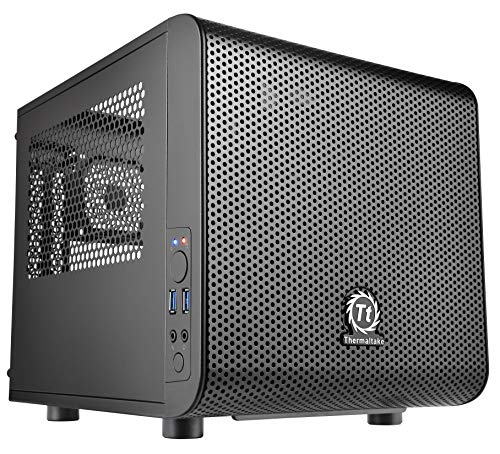
The Thermaltake Core V1 takes a different approach from the tower and sandwich cases above. It is a cube, with the motherboard mounted horizontally and the main chamber divided so that cooling sits above and the power supply and cable storage sit below. That layout makes the board easy to reach, and the interchangeable side panels let you choose between a window panel and a vented panel.
One practical advantage is power supply support. The Core V1 accepts a standard PS2 power supply up to 180 mm long, which means many builders can reuse a power supply they already own instead of buying a smaller SFX unit. It also includes a large 200 mm front fan, which moves a good volume of air through the cube without needing several smaller fans. Storage is flexible too, with modular drive racks for 2.5-inch and 3.5-inch drives, and the case accepts a tower CPU cooler up to 140 mm tall. The limits are tied to the cube shape: graphics card length is limited to 285 mm, and only two expansion slots are available, so a very long or very thick card will not fit.
4. SilverStone SG13 — Best Small and Simple Mini-ITX Case
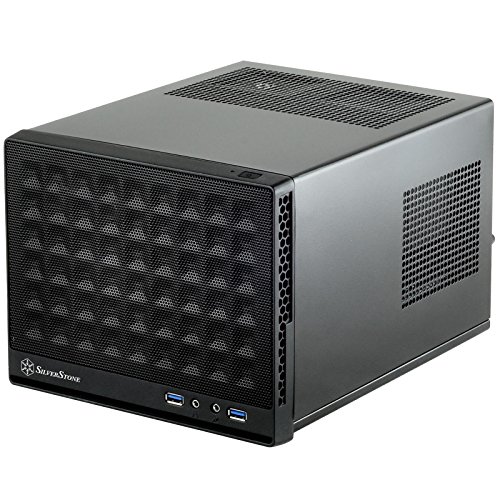
The SilverStone SG13 is the smallest and simplest case in this group, and it suits builders who know exactly what they want and do not need extra room for future changes. At about 11.5 litres, it is a compact cube that accepts a mini-ITX motherboard and a short to medium graphics card, depending on the exact model and the power supply length you choose. The mesh front panel helps air reach the interior, which is important in a case this small.
The SG13 is flexible about power supplies in a way that many compact cases are not. It can accept a standard ATX power supply, although a longer ATX unit reduces the space available for the graphics card and the cooler. An SFX power supply with an adapter bracket frees up more room and is often the better choice if you are buying a new unit. The case also works well with a 120 mm liquid cooler mounted at the front. A low-profile air cooler is the alternative if you prefer air cooling.
The trade is that the SG13 leaves little margin for error. Cable management is tight, drive mounting is limited, and a long graphics card combined with a long power supply can create a conflict that only becomes clear during the build. Measure the graphics card, the power supply, and the cooler together before you order.
What to Check Before You Buy
Before you order a case, run through a short checklist with your parts list open. First, confirm the motherboard is mini-ITX and note the CPU socket position, the memory slot height, and any tall heatsinks. Second, write down the graphics card length, thickness, and height, and compare all three with the case limits. Third, confirm the power supply type and length, and check whether the case needs SFX, SFX-L, or a standard ATX unit. Fourth, decide on air cooling or liquid cooling, and confirm cooler height or radiator size, thickness, and tubing route. Fifth, count your storage drives and confirm the mounts and cables. Sixth, check the front panel ports and the cable lengths for the case headers, because a short front-panel cable can be awkward in a small chassis.
Also check the case dimensions against the space where the computer will live. Leave clearance behind the case for power and display cables, and leave clearance at the intake and exhaust vents so air can move freely. If the computer will sit in a media unit, measure the shelf height, depth, and ventilation as well as the case itself.
Finally, keep the manuals and the spare screws together during the build. A dry fit, with the motherboard, graphics card, cooler, and power supply placed in the case before cables are connected, will reveal most fit problems while they are still easy to fix.
FAQ
What does “a m itx” mean in this keyword?
The phrase “a m itx” is a spacing artifact for mini-ITX. It refers to the mini-ITX motherboard form factor, which measures 170 by 170 millimetres. This guide uses the term mini-ITX throughout the body, and every case listed here is designed for a mini-ITX motherboard.
Can a mini-ITX case accept a larger motherboard?
No. A case designed for mini-ITX motherboards does not accept a Micro-ATX or ATX motherboard, because the mounting points, the expansion slot positions, and the internal dimensions are different. If you own a larger board, you need a case made for that form factor.
Do I need an SFX power supply for a mini-ITX build?
It depends on the case. The Cooler Master NR200 and the Fractal Design Terra need an SFX or SFX-L power supply, while the Thermaltake Core V1 and the SilverStone SG13 can accept a standard ATX power supply within their stated length limits. Check the case specification before you buy, and do not assume that a power supply from a larger build will fit.
Is a mini-ITX computer harder to cool than a larger computer?
A mini-ITX computer can run just as cool as a larger one when the parts are matched to the case, but it has less room for error. Airflow paths are shorter, fans sit closer to hot parts, and a component that blocks a vent has a larger effect. Choose a cooler that fits with clearance, keep intake and exhaust paths clear, and clean the dust filters regularly.
Bottom Line
The best cases for a m itx motherboards are the ones that match your graphics card, cooler, and power supply, not simply the smallest or the most eye-catching case on the list. Start with the Cooler Master NR200 for the widest hardware support, choose the Fractal Design Terra for a compact and attractive desk build, pick the Thermaltake Core V1 if you want a cube layout and a standard power supply, and consider the SilverStone SG13 for the smallest and simplest option. Measure twice, confirm the power supply type, and choose your cooling route before you order, and a mini-ITX build can be compact, capable, and easy to live with.
Disclosure: As an Amazon Associate, we may earn from qualifying purchases.