Key takeaways
- The best cpu coolers for overclocking keep high-end chips cool under sustained load. Compare three dual-tower air coolers and pick the right fit today.
Overclocking pushes a processor past its stock clock speeds, and every extra step of frequency and voltage adds heat the cooler has to move away from the chip. A cooler that is perfectly fine at stock settings can run out of headroom quickly once you raise power limits, which is why the best cpu coolers for overclocking are almost always large dual-tower air coolers with dense fin stacks, multiple heat pipes, and strong mounting pressure. Headroom is the real goal: the more thermal capacity you have in reserve, the lower your temperatures stay during long stress runs, and the quieter the fans can spin while holding them.
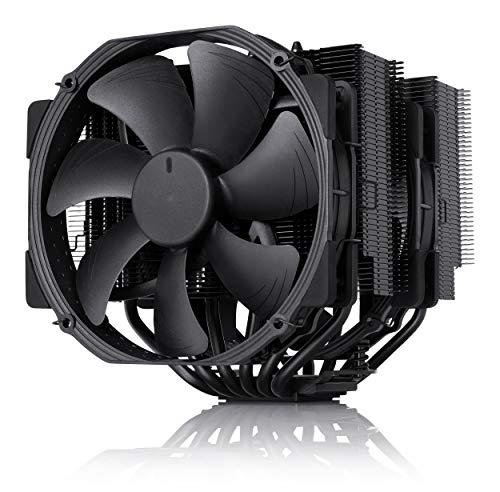

This guide is for builders running or planning an overclock on a modern Intel or AMD desktop who want air cooling rather than a liquid loop. The three coolers below were chosen from their Amazon listing names and stated specifications only — heat pipe counts, fan sizes and speeds, dimensions, socket support, and rated noise — with no practical claims of any kind. All three are dual-tower designs with six heat pipes, but they differ in fan size, height, noise rating, and extras, so the right pick depends on your case, your chip, and how much you value silence against monitoring features.
Quick Picks
| Product | Best for | Key spec |
|---|---|---|
| Noctua NH-D15 chromax.Black | Maximum headroom with the quietest fans | Two NF-A15 140mm PWM fans, 24.6 dBA max |
| Thermalright Peerless Assassin 120 SE | Compact cases that still need overclocking capacity | 155mm height, around 245–250W TDP class |
| Thermalright Peerless Assassin 120 Digital Black | Builders who want live system stats on the cooler | Magnetic digital display board top cover |
How to Choose
Heat pipe count and fin stack size
Heat pipes carry heat from the cold plate into the fin stack, and the fin stack is where that heat actually leaves the cooler. For overclocking, six heat pipes feeding two towers of fins is the proven formula in this roundup: all three coolers here use that layout. More fin surface area means the cooler can shed more heat before fan speeds have to climb, which is what buys you sustained headroom during an all-core workload rather than a short burst.
Fan size, speed, and noise
Fan diameter matters as much as fan speed. A 140mm fan moves a given volume of air at lower rotational speed than a 120mm fan, so it can do the same work more quietly. The Noctua NH-D15 chromax.Black pairs two 140mm NF-A15 fans rated up to 1,500 RPM and 24.6 dBA at maximum, while the Thermalright Peerless Assassin 120 SE uses two 120mm TL-C12C fans at 1,550 RPM, 66.17 CFM, and 25.6 dBA. Those numbers are close on paper, but if you sit near your PC during long rendering or compiling sessions, the larger, slower-turning fans are the more comfortable choice.
Case clearance and RAM space
Dual-tower coolers are tall and wide, and they will not fit every case or every memory kit. Heights in this guide range from 155mm on the Peerless Assassin 120 SE to roughly 165–168mm on the NH-D15 chromax.Black, so measure your case’s CPU cooler clearance before ordering. Width matters too: a wide front tower can overhang the first memory slots, which can conflict with tall RGB memory heat spreaders. Checking the cooler’s stated dimensions against your case and RAM height is the single easiest way to avoid a return.
Socket support and mounting hardware
An overclocking cooler is a long-term purchase, so confirm it mounts to your socket today and ideally to the platform you might move to next. The NH-D15 chromax.Black uses Noctua’s SecuFirm2 system for Intel LGA1700, LGA1200, and 115x sockets plus AMD AM5 and AM4. The Peerless Assassin 120 SE covers AM5 and AM4 along with Intel LGA1700, LGA1851, LGA1200, and 115x. The Peerless Assassin 120 Digital Black lists AMD AM4 and AM5 with Intel LGA1700, LGA1851, LGA1150, LGA1151, and LGA1200. A firm, even mounting system also matters for overclocking because consistent contact pressure keeps heat transfer efficient under heavy load.
The 3 Best Options
Noctua NH-D15 chromax.Black, Dual-Tower CPU Cooler (140mm, Black)
The NH-D15 chromax.Black is the flagship option in this roundup, built around a dual-tower heatsink with six copper heat pipes and two NF-A15 140mm PWM fans. The listing describes it as having flagship TDP headroom rated for overclocked high-end CPUs, which is exactly the use case this guide is about. The all-black chromax finish also suits builders who want a high-end cooler that does not clash with a themed build.
Noise is where this cooler separates itself. Its fans top out at 1,500 RPM with a stated maximum of 24.6 dBA, the lowest noise ceiling of the three coolers here, and the package includes NT-H1 thermal paste plus a six-year manufacturer warranty. The trade-off is physical size: at 165–168mm tall, it needs a case with generous cooler clearance.
Specs
- Brand: Noctua
- Model: NH-D15 chromax.Black
- Heat pipes: 6 copper heat pipes, dual-tower design
- Fans: Two NF-A15 140mm PWM fans, up to 1,500 RPM
- Noise: 24.6 dBA maximum
- Height: 165–168mm
- Mounting: SecuFirm2 for Intel LGA1700/1200/115x and AMD AM5/AM4
- Included: NT-H1 thermal paste
- Warranty: 6-year manufacturer warranty
- Amazon: View on Amazon
Best for: Overclockers running high-end Intel or AMD chips who want the most headroom with the quietest fans and a long warranty behind the purchase.
Watch out for: The 165–168mm height rules out many smaller cases, and the wide front tower can crowd tall memory modules in the first slot.
Thermalright Peerless Assassin 120 SE CPU Cooler (PA120 SE)
The Peerless Assassin 120 SE takes the same dual-tower, six-heat-pipe formula and packages it into a shorter cooler. Its six 6mm heat pipes use AGHP anti-gravity technology with a nickel-plated copper base, and the cooler is rated around the 245–250W TDP class, which covers the power draw of most overclocked mainstream and high-end desktop chips.
At 125 x 135 x 155mm, it is meaningfully easier to fit than the Noctua, and its two TL-C12C 120mm PWM fans deliver 66.17 CFM at 1,550 RPM with a stated 25.6 dBA. Socket coverage is broad, spanning AMD AM5 and AM4 plus Intel LGA1700, LGA1851, LGA1200, and 115x, so it can follow you across a platform upgrade.
Specs
- Brand: Thermalright
- Model: Peerless Assassin 120 SE (PA120 SE)
- Heat pipes: 6 x 6mm heat pipes with AGHP anti-gravity technology
- Base: Nickel-plated copper
- Fans: Two TL-C12C 120mm PWM fans, 1,550 RPM, 66.17 CFM, 25.6 dBA
- Dimensions: 125 x 135 x 155mm
- TDP class: Around 245–250W
- Mounting: AMD AM5/AM4 and Intel LGA1700/1851/1200/115x included
- Amazon: View on Amazon
Best for: Builders in mid-tower or smaller cases who still want dual-tower overclocking headroom and wide socket compatibility.
Watch out for: The 120mm fans spin faster and are rated slightly louder than the Noctua’s 140mm pair, and the 155mm height still needs checking against compact cases.
Thermalright Peerless Assassin 120 Digital Black CPU Cooler with Magnetic Display Top Cover
The Peerless Assassin 120 Digital Black builds on the same Peerless Assassin dual-tower heatsink platform, with six 6mm heat pipes and dual 120mm PWM fans, and the platform is described as rated for high-TDP overclocking headroom. What sets this version apart is the top cover: a magnetic digital display board that shows system stats, turning the cooler into a small monitoring panel inside the case.
That display makes this the pick for windowed builds where you like keeping an eye on system information at a glance without opening software. Socket support covers AMD AM4 and AM5 plus Intel LGA1700, LGA1851, LGA1150, LGA1151, and LGA1200. If your case has no window, the display adds little, and the standard Peerless Assassin 120 SE covers the same cooling job in a plainer package.
Specs
- Brand: Thermalright
- Model: Peerless Assassin 120 Digital Black
- Heat pipes: 6 x 6mm heat pipes, dual-tower design
- Fans: Dual 120mm PWM fans
- Top cover: Magnetic digital display board showing system stats
- Platform: Peerless Assassin dual-tower heatsink, rated for high-TDP overclocking headroom
- Mounting: AMD AM4/AM5 and Intel LGA1700/1851/1150/1151/1200
- Amazon: View on Amazon
Best for: Builders with a windowed case who want dual-tower overclocking capacity plus a live system-stats display on the cooler itself.
Watch out for: The display is only useful if you can see into your case, and the listing’s stated specifications are thinner than the other two coolers here, so double-check dimensions on the product page before ordering.
Which One Fits Your Situation
You want the quietest overclock possible
Choose the Noctua NH-D15 chromax.Black. Its two 140mm fans carry the lowest maximum noise rating in this roundup at 24.6 dBA, and its flagship TDP headroom is aimed squarely at overclocked high-end CPUs. As long as your case clears its 165–168mm height, it is the set-and-forget option.
Your case is on the smaller side
Choose the Thermalright Peerless Assassin 120 SE. At 155mm tall it fits cases the Noctua cannot, while its roughly 245–250W TDP class and six heat pipes still leave real room for overclocking. It is the balanced pick when clearance, not silence, is your limiting factor.
You like monitoring your system
Choose the Thermalright Peerless Assassin 120 Digital Black. You get the same dual-tower Peerless Assassin platform with high-TDP headroom, plus a magnetic digital display on the top cover showing system stats. It is the natural fit for a tempered-glass build.
You plan to change platforms later
Any of the three will travel with you, but check the socket lists closely. The Peerless Assassin models add Intel LGA1851 support alongside LGA1700, while the Noctua’s SecuFirm2 kit covers LGA1700, LGA1200, 115x, AM5, and AM4. Match the list to the board you own now and the one you are eyeing next.
Common Mistakes
- Buying a cooler before measuring case clearance, then finding a 165–168mm tower will not fit under the side panel.
- Ignoring RAM height, so the front fan or tower overhangs the first memory slot and conflicts with tall heat spreaders.
- Assuming a cooler rated for stock chips has headroom for an overclock, when sustained all-core loads need a higher TDP class.
- Forgetting to confirm socket support, especially on newer platforms such as AM5 and LGA1851, before ordering.
- Skipping thermal paste or reusing old paste; the NH-D15 chromax.Black includes NT-H1, but every install needs a fresh application.
Frequently Asked Questions
Is air cooling enough for overclocking?
For most desktop overclocks, yes. All three coolers in this guide are dual-tower designs with six heat pipes, and the listings rate them for high-TDP or overclocked high-end CPUs. The Peerless Assassin 120 SE, for example, sits in the 245–250W TDP class. Extreme overclocks with heavily raised power limits can exceed what any air cooler handles, but for everyday frequency and voltage bumps, a cooler of this size is the standard choice.
How much cooler clearance do I need?
At minimum, your case’s stated CPU cooler clearance must exceed the cooler’s height: 155mm for the Peerless Assassin 120 SE and 165–168mm for the NH-D15 chromax.Black. Leave a little extra room beyond the stated figure, since front fans raised to clear tall RAM can add height in practice.
Does fan size really matter for an overclocking cooler?
It matters for noise more than for raw capacity. A 140mm fan like the Noctua’s NF-A15 moves air at lower speeds, which is why the NH-D15 chromax.Black carries a 24.6 dBA maximum rating against 25.6 dBA for the 120mm fans on the Peerless Assassin 120 SE. Both approaches cool well; the larger fans simply do it a bit more quietly.
Will these coolers fit my motherboard socket?
Most likely, but verify against the lists. The NH-D15 chromax.Black supports Intel LGA1700, LGA1200, and 115x plus AMD AM5 and AM4. The Peerless Assassin 120 SE supports AM5, AM4, LGA1700, LGA1851, LGA1200, and 115x. The Digital Black supports AM4, AM5, LGA1700, LGA1851, LGA1150, LGA1151, and LGA1200. If your socket is not listed, look for a mounting kit from the manufacturer before assuming compatibility.
Related guides
- Best CPU coolers with push pins
- Best CPU coolers with thermal paste included
- Best top down CPU coolers
- Best power supplies for high-end gaming builds
As an Amazon Associate, we earn from qualifying purchases.