Our Short List of 3
All 3 Picks at a Glance
| Product | Specs | Action |
|---|---|---|
 MATEIN Travel Laptop Backpack (B06XZTZ7GB) | Check price on Amazon | |
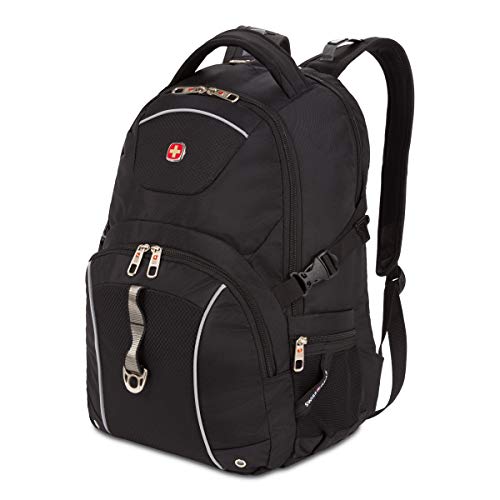 SwissGear 3258 ScanSmart (B017NCK9RQ) | Check price on Amazon | |
 JanSport Big Student (B0D3JD4SRQ) | Check price on Amazon |
Key takeaways
- Four laptop backpacks suited to work and commuting, compared on laptop fit, organisation, carry comfort and build, from slim daily packs to a 17-inch carry-on.
A work backpack has a harder job than a school bag. It has to protect a laptop worth real money, swallow a charger, notebook, lunch and gym layer without bulging, look acceptable in a meeting room, and survive being swung into overhead bins and under train seats five days a week. The four packs below are all still sold new on Amazon US, and each one suits a slightly different kind of working day, from the slim daily commute to the overnight business trip.
What makes a backpack work-ready
A suspended, padded laptop sleeve. The best designs hold the laptop off the base of the bag, so a dropped pack does not drive the corner of the machine into the floor. Check the stated fit carefully: a sleeve rated for 15.6 inches will not take most 17-inch laptops, and a 17-inch pack can feel cavernous around a slim 13-inch ultrabook.
Organisation that matches a workday. Look for a separate tech pocket for cables and a mouse, a quick-access pocket for a phone and pass, and a main compartment that opens wide enough to pack flat. Packs with a lay-flat design also speed up airport security, since the laptop section can open separately on the belt.
Carry comfort. Padded shoulder straps, a breathable back panel and a luggage pass-through strap are the three features commuters feel every day. A sternum strap helps on longer walks. If you cycle, add reflective details and a rain cover to your checklist.
Materials and zips. Dense woven polyester or ballistic-style fabrics shrug off daily abrasion, and reputable branded zips matter more than almost anything else, because a failed zip ends a backpack’s working life on the spot.
Sizing: the mistake almost everyone makes once
Backpack listings lead with screen size, but screens are measured diagonally while sleeves are measured in straight lines. A slim 15.6-inch ultrabook and a thick 15.6-inch gaming laptop share a screen size and almost nothing else, and the gaming machine can be too deep or too thick for a sleeve that swallows the ultrabook easily. The reliable method is to measure your laptop’s width, depth and thickness, then compare those three numbers with the sleeve’s internal dimensions, which manufacturers publish on their own product pages. Leave a small margin rather than forcing a tight fit, because a zip strained around an oversized machine is a zip that will fail early. If you carry a second device, a tablet or an e-reader, check for a separate padded pocket so the two screens are not riding against each other.
Security and weather details worth having
Commuting exposes a bag to crowded platforms and sudden rain, and a few design details answer both. Lockable zip pulls and a hidden pocket against the back panel keep a wallet and passport out of a pickpocket’s easy reach. A slash-resistant pocket lining is rare at these prices, but a back-panel pocket achieves much the same effect by keeping valuables against your body. For weather, water-repellent coatings handle drizzle, while welded seams and a proper rain cover handle a soaked ride home. None of the four picks below is a fully waterproof cycling pack, and this guide will not pretend otherwise; they are commuter bags that treat rain as an inconvenience rather than an emergency. If your commute is a long bike ride in all seasons, budget for a rain cover and pack electronics in a dry bag inside whichever pack you choose.
How long a work backpack should last
A daily-carried pack lives a hard life: zips cycled thousands of times, straps loaded at the stitching, corners dragged across floors. Expect the packs here to serve for years when the load stays reasonable, and watch two early warning signs. Fraying at the strap anchor points means the stitching is working loose, and a zip that starts splitting behind the pull means the coil is worn. Both are repairable by a luggage repair shop for far less than a replacement bag. Shoulder strap foam also compresses over time, which is why a pack that felt perfect when new can feel tired after a few years of heavy books. Rotating the load, packing heavy items against the back panel, and not overfilling the main compartment all extend the working life of any of these designs.
The picks
MATEIN Travel Laptop Backpack (B06XZTZ7GB)
The MATEIN Travel is the dependable all-rounder of this group. Built around a 15.6-inch laptop sleeve, it adds a separate electronics organiser, a luggage strap for rolling cases, and a USB pass-through port for charging a phone from a power bank inside the bag. The grey finish reads professional enough for most offices, the back panel is padded for longer walks, and the main compartment takes a change of clothes alongside work gear. It is the pack to choose if you want one bag that handles the commute, the gym stop and the occasional overnight trip without specialising in any single one.
MATEIN Carry-On Travel Backpack, 17 inch (B07NV3VZ76)
This larger MATEIN sibling is the pick for 17-inch laptops and heavier loads. The carry-on-sized body opens suitcase-style, which makes packing for a two-day business trip far easier than a top-loading design, and the laptop compartment is separated from the main space for quick security checks. Compression straps keep a part-filled bag tidy, and the straps can tuck away when you want to carry it briefcase-style through a client lobby. It is more bag than a light daily commute needs, but for consultants and field staff who live out of their backpack, the capacity earns its place.
SwissGear 3258 ScanSmart (B017NCK9RQ)
SwissGear’s 3258 is the traditional office choice. The ScanSmart laptop compartment fits machines up to 17 inches and opens flat for airport screening, the organiser panel is one of the most detailed in this group with dedicated slots for pens, cards and cables, and the padded airflow back panel keeps a shirt presentable on a warm commute. A fleece-lined pocket protects sunglasses or a phone screen. It looks the most corporate of the four picks, which for many workplaces is precisely the point.
JanSport Big Student (B0D3JD4SRQ)
The Big Student is the simple, durable option. Two large main compartments and a 34-litre capacity swallow books, files, a laptop in its sleeve and a packed lunch with room to spare, and the padded back panel and straps keep it comfortable on a long walk to the station. It lacks the dedicated tech organisation and luggage strap of the packs above, and most buyers add a separate padded sleeve for the laptop, but the construction has a long track record of surviving years of daily use. Choose it if your workday is casual, your load is bulky, and you value capacity and simplicity over tailored organisation.
Packing the bag so it carries well
How a backpack is loaded matters as much as which one you buy. Heavy items, the laptop and any books, belong flat against the back panel, where their weight sits close to your centre of gravity. Medium items go in the middle of the main compartment, and light, bulky items such as a jacket belong at the top or in an outer pocket. Cables, a mouse and chargers ride best in the organiser section rather than loose at the bottom, where they migrate into a tangled layer and add pressure points against the laptop sleeve. Tighten the shoulder straps so the pack rides high rather than hanging from the lower back, and use the sternum strap on longer walks to stop the straps wandering outward. A well-packed mid-size pack will feel lighter than a badly packed smaller one, which is why commuters who reorganise their bag once, deliberately, tend to stop shopping for replacements.
A word on style in the workplace
Workplaces differ, and the right look differs with them. The SwissGear and the two MATEIN packs read as business equipment in grey, black and navy colourways, suitable for client-facing roles and formal offices. The JanSport reads as casual and youthful, which suits creative studios, campuses and most modern tech offices, and can look out of place in a law firm. None of that affects how well they carry a laptop, but a bag you feel self-conscious about is a bag you will replace early. Choose the appearance you will be happy to be seen with every working day, in the colour that matches the coats and shoes you actually wear.
How to choose
Measure your laptop first, including its depth, and match it to the sleeve’s stated fit rather than the headline size of the bag. If you fly for work, prioritise a lay-flat laptop section and a luggage strap, which points to the SwissGear or the larger MATEIN. If you carry one slim machine and little else, the standard MATEIN Travel keeps the profile tidy. If your load is mostly volume, the JanSport’s capacity wins. In all cases, check the zip quality and strap stitching when the pack arrives, since those two details predict how long it will stay in service.
Frequently asked questions
Can a 15.6-inch backpack fit a 16-inch laptop? Sometimes, but not reliably. Modern 16-inch laptops with slim bezels can match older 15.6-inch dimensions, so compare the laptop’s physical measurements with the sleeve’s internal measurements rather than trusting the screen sizes.
Are these packs water resistant? All four use water-repellent fabrics that shrug off light rain. For a cycling commute in heavy weather, add a rain cover or choose a pack with a fully waterproof shell.
What is a luggage pass-through strap for? It slides over the handle of a rolling suitcase so the backpack rides on top through the airport. It is a small feature that frequent travellers end up valuing more than almost any other.
Do I need a separate laptop sleeve as well? If the pack has a suspended, padded compartment sized for your machine, no. With the JanSport, whose main compartments are unpadded, a slim sleeve is a sensible addition and still leaves the total spend reasonable.
How should I clean a work backpack? Empty it, shake out the compartments, and wash by hand in cool water with mild soap. Machine washing can damage coatings and foam. Air dry away from direct heat, and leave zips open so the interior dries fully.
Disclosure: As an Amazon Associate, this site may earn from qualifying purchases made through links in this article, at no additional cost to you.