Key takeaways
- Compare the best SD memory cards for digital cameras, from fast UHS-I V30 cards to UHS-II V90 cards for 4K video, bursts, and everyday shooting.
A digital camera is only as quick as the card inside it. A slow card makes a camera pause between bursts, cut a video clip short, or take forever to clear its buffer after a long sequence of shots. A fast card keeps up with the camera, moves files to a computer quickly, and holds enough stills and clips for a full day of shooting.

This guide covers full-size SD, SDHC, and SDXC cards made for digital cameras. Every pick below is a full-size SD card with its bus type and video speed class confirmed on its listing. No microSD cards, no CFexpress cards, and no USB drives appear here, because a camera with a full-size SD slot needs a full-size SD card.
Disclosure: As an Amazon Associate, we earn from qualifying purchases.
Quick Picks
Our Short List of 3
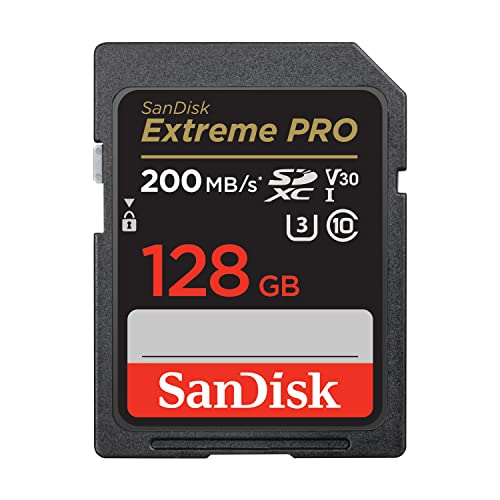
- Best for: photographers and videographers who want a proven all-round card for stills and 4K video in a UHS-I camera.
- Capacity: 128GB SDXC
- Bus: UHS-I
- Speed class: Class 10, U3, V30
- Listed read speed: up to 200MB/s with QuickFlow Technology
- Best for: professional hybrid shooters, outdoor and travel photographers, and anyone recording high-bitrate video in rough conditions.
- Capacity: 128GB SDXC
- Bus: UHS-II
- Speed class: Class 10, U3, V90
- Listed read speed: up to 300MB/s

- Best for: sports and wildlife shooters who fire long bursts, and videographers who want V90 speed plus a reader in the box.
- Capacity: 128GB SDXC
- Bus: UHS-II
- Speed class: Class 10, U3, V90
- Listed read speed: up to 300MB/s
All 5 Picks at a Glance
| Product | Specs | Action |
|---|---|---|
| SanDisk Extreme Pro SDXC UHS-I 128GB |
| Check price on Amazon |
| Sony SF-G Tough Series SDXC UHS-II 128GB |
| Check price on Amazon |
| Lexar Professional 2000x SDXC UHS-II 128GB |
| Check price on Amazon |
 Kingston Canvas React Plus SDXC UHS-II 128GB |
| Check price on Amazon |
 Samsung Pro Plus SDXC UHS-I 128GB |
| Check price on Amazon |
For stills and occasional 4K clips, the SanDisk Extreme Pro UHS-I or the Samsung Pro Plus cover the job at a lower tier of speed. For high-bitrate video, long raw bursts, or 8K clips, a V90 UHS-II card such as the Sony Tough, the Lexar 2000x, or the Kingston Canvas React Plus is the right tier.
How to Choose
UHS-I vs UHS-II
UHS-I and UHS-II describe the bus, the electrical interface between the card and the camera. A UHS-I card has one row of contact pins and tops out near 104MB/s in theory, though some UHS-I cards read faster in a matching reader. A UHS-II card has a second row of pins and reaches listed read speeds near 300MB/s.
The camera decides how much of that speed you get. A UHS-II card works in a UHS-I slot, but it runs at UHS-I speed, so the extra speed is wasted until you move to a camera with a UHS-II slot. Check the camera manual for the slot type before paying for UHS-II speed. If the camera mixes one UHS-II slot with one UHS-I slot, put the faster card in the UHS-II slot.
Video Speed Class: V30, V60, and V90
The video speed class marks the minimum sustained write speed the card guarantees for video: V30 means at least 30MB/s, V60 means at least 60MB/s, and V90 means at least 90MB/s. Peak read and write figures on the box are not the same thing. A card can claim a 300MB/s peak and still carry only a V30 mark, which means its guaranteed floor for video is 30MB/s.
V30 suits 4K video at common bitrates and most stills work. V60 suits higher-bitrate 4K and some 6K modes. V90 suits the highest-bitrate 4K, 6K, and 8K modes, and cameras that demand V90 for certain codecs will refuse to record without it. When a camera manual names a minimum video class, treat that as a hard requirement, not a suggestion.
Capacity vs Camera
Capacity is a trade-off between room and risk. A 128GB card holds thousands of high-resolution stills or hours of 4K video, which suits most shooters for a day out. Larger cards hold more, but they also put more work on one card: if a single card fails or is lost, everything on it goes with it. Many photographers carry two 128GB cards instead of one 256GB card.
Check the camera manual for the largest capacity it accepts. Older cameras may cap out at 32GB SDHC cards, while modern bodies accept SDXC cards up to 1TB or more. A card larger than the camera supports may not format at all. Format every new card in the camera, not on a computer, so the camera writes the file structure it expects.
Counterfeit Risks
Fake SD cards are common, and they are the worst kind of false economy: a counterfeit card may show a large capacity on a computer while holding only a fraction of it, then silently overwrite earlier files once it fills up. Buy from the brand store or a seller Amazon itself fulfills, and be wary of listings far below every other seller for the same model.
When a card arrives, check the packaging for clean printing, a serial number, and a hologram where the brand uses one. Then test the card before trusting it with a shoot: fill it completely with files, copy them back, and confirm every file opens. Free tools such as H2testw on Windows or F3 on Mac do this check. A genuine card passes at its full labeled capacity; a fake one fails.
Other Details That Matter
Durability matters for cards that travel. Look for water, temperature, shock, and X-ray proofing on the listing, and note whether the card has a write-protect switch. Some rugged cards drop the switch and the ribs entirely, which removes two parts that can break, but it also removes the physical lock that stops accidental erasure.
A bundled card reader is a real bonus for UHS-II cards, since a slow reader caps transfer speed no matter how fast the card is. If no reader is included, plan on a UHS-II reader to get the listed offload speeds.
Best SD Memory Cards for Digital Cameras
SanDisk Extreme Pro SDXC UHS-I 128GB
- Best for: photographers and videographers who want a proven all-round card for stills and 4K video in a UHS-I camera.
- Capacity: 128GB SDXC
- Bus: UHS-I
- Speed class: Class 10, U3, V30
- Listed read speed: up to 200MB/s with QuickFlow Technology
photographers and videographers who want a proven all-round card for stills and 4K video in a UHS-I camera.
the 200MB/s read figure needs a SanDisk Pro-Reader or a similar QuickFlow-capable reader; in a plain reader it runs slower. It is a V30 card, so it does not meet the V60 or V90 minimums some high-bitrate video modes demand.
The SanDisk Extreme Pro UHS-I is the safe default for most digital cameras. It pairs a V30 video class with listed read speeds up to 200MB/s through SanDisk QuickFlow Technology, which needs a matching reader to reach its top figure, and shot speeds up to 90MB/s for burst shooting. It handles 4K UHD video and sequential bursts without drama in cameras with UHS-I slots, which still covers most bodies in use today.
Watch out for: the 200MB/s read figure needs a SanDisk Pro-Reader or a similar QuickFlow-capable reader; in a plain reader it runs slower. It is a V30 card, so it does not meet the V60 or V90 minimums some high-bitrate video modes demand.
Sony SF-G Tough Series SDXC UHS-II 128GB
- Best for: professional hybrid shooters, outdoor and travel photographers, and anyone recording high-bitrate video in rough conditions.
- Capacity: 128GB SDXC
- Bus: UHS-II
- Speed class: Class 10, U3, V90
- Listed read speed: up to 300MB/s
professional hybrid shooters, outdoor and travel photographers, and anyone recording high-bitrate video in rough conditions.
there is no write-protect switch, so you cannot lock the card against accidental erasure. It only reaches full speed in a UHS-II slot; in a UHS-I camera it runs at UHS-I speed.
The Sony SF-G Tough is built for shooters who punish their gear. Its one-piece molded body has no ribs and no write-protect switch, which removes the two parts that break most often on standard cards. Sony lists bend strength 18 times greater than the SD standard, drop protection to 5 meters, waterproofing to IPX8, and dustproofing to IP6X. On speed it is a full V90 UHS-II card with listed read speeds up to 300MB/s and write speeds up to 299MB/s, which covers high-bitrate 4K, 6K, and 8K recording.
Watch out for: there is no write-protect switch, so you cannot lock the card against accidental erasure. It only reaches full speed in a UHS-II slot; in a UHS-I camera it runs at UHS-I speed.
Lexar Professional 2000x SDXC UHS-II 128GB
- Best for: sports and wildlife shooters who fire long bursts, and videographers who want V90 speed plus a reader in the box.
- Capacity: 128GB SDXC
- Bus: UHS-II
- Speed class: Class 10, U3, V90
- Listed read speed: up to 300MB/s
sports and wildlife shooters who fire long bursts, and videographers who want V90 speed plus a reader in the box.
only 64GB and 128GB capacities exist in this line, so shooters who want a single large card need a different model. As with every UHS-II card, a UHS-I slot caps its speed, so confirm the camera slot type first.
The Lexar Professional 2000x has been a staple V90 card for years, and it remains a strong choice for burst shooting and fast offloads. It lists read speeds up to 300MB/s and write speeds up to 260MB/s over UHS-II, with a V90 mark that guarantees at least 90MB/s sustained writes. Lexar includes a UHS-II card reader in the box, so the listed transfer speeds are reachable without a separate reader.
Watch out for: only 64GB and 128GB capacities exist in this line, so shooters who want a single large card need a different model. As with every UHS-II card, a UHS-I slot caps its speed, so confirm the camera slot type first.
Kingston Canvas React Plus SDXC UHS-II 128GB
- Best for: videographers recording 4K and 8K who want V90 speed and a bundled reader for quick offloads.
- Capacity: 128GB SDXC
- Bus: UHS-II
- Speed class: Class 10, U3, V90
- Listed read speed: up to 300MB/s
videographers recording 4K and 8K who want V90 speed and a bundled reader for quick offloads.
Kingston sells a microSD card under a similar Canvas React Plus name, so confirm the listing says full-size SDXC and shows model SDR2/128GB before ordering. The card needs a UHS-II slot to reach its listed speeds.
The Kingston Canvas React Plus is a V90 UHS-II card aimed squarely at video work. It lists read speeds up to 300MB/s and write speeds up to 260MB/s, with the V90 floor of 90MB/s sustained writes for high-bitrate and 8K capture. Kingston bundles a UHS-II USB reader with the card, which keeps offload times short without an extra purchase.
Watch out for: Kingston sells a microSD card under a similar Canvas React Plus name, so confirm the listing says full-size SDXC and shows model SDR2/128GB before ordering. The card needs a UHS-II slot to reach its listed speeds.
Samsung Pro Plus SDXC UHS-I 128GB
- Best for: everyday shooters and travelers who want reliable 4K-ready storage at the lower speed tier.
- Capacity: 128GB SDXC
- Bus: UHS-I
- Speed class: Class 10, U3, V30
- Listed read speed: up to 180MB/s
everyday shooters and travelers who want reliable 4K-ready storage at the lower speed tier.
Samsung also sells a microSD Pro Plus card with an SD adapter under a similar name, so confirm the listing says full-size SDXC and shows model MB-SD128S/AM. It is a V30 card, so it does not cover video modes that demand V60 or V90.
The Samsung Pro Plus is the value pick in this roundup. It is a full-size UHS-I SDXC card with a V30 mark and listed read speeds up to 180MB/s and write speeds up to 130MB/s, which covers 4K UHD video and burst stills in most cameras. Samsung lists a working temperature range of minus 25C to 85C, protection against water, shock, magnets, and X-rays, and a limited 10-year warranty.
Watch out for: Samsung also sells a microSD Pro Plus card with an SD adapter under a similar name, so confirm the listing says full-size SDXC and shows model MB-SD128S/AM. It is a V30 card, so it does not cover video modes that demand V60 or V90.
Which One Fits
Match the card to the camera first, then to the work. If the camera has only UHS-I slots, buy a V30 UHS-I card such as the SanDisk Extreme Pro or the Samsung Pro Plus; a V90 UHS-II card would run at UHS-I speed and waste its extra capability. If the camera has a UHS-II slot and you shoot high-bitrate video or long raw bursts, buy a V90 card such as the Sony Tough, the Lexar 2000x, or the Kingston Canvas React Plus.
For travel and outdoor work, the Sony Tough is the natural fit because its one-piece body removes the fragile parts and its sealing handles rain, dust, and drops. For studio and event video, the Lexar 2000x or the Kingston Canvas React Plus fit well, since both include a UHS-II reader and their V90 floor covers demanding codecs.
One 128GB card suits a day of stills or a few hours of 4K video for most shooters. If you record long video takes, carry two cards and swap at natural breaks instead of relying on a single large card, so a lost card costs half a day, not the whole shoot.
Common Mistakes
Buying a microSD card for a full-size slot. A microSD card in an adapter works in a pinch, but adapters add a failure point and most microSD cards are slower than full-size cards at the same tier. If the camera takes full-size SD, buy full-size SD.
Paying for UHS-II speed a UHS-I camera cannot use. A V90 card in a UHS-I slot still records reliably, but it runs at UHS-I speed. Check the camera manual for the slot type before choosing between the UHS-I and UHS-II tiers.
Judging a card by its peak speed alone. The peak read figure describes offloads to a computer, not recording. The video speed class is the figure that governs recording: V30, V60, and V90 mark guaranteed minimum sustained writes of 30, 60, and 90MB/s. A card with a high peak and a low video class can still drop frames in a demanding video mode.
Skipping the in-camera format. A new card should be formatted in the camera before first use. Formatting on a computer can leave a file structure the camera does not expect, which leads to errors mid-shoot. Format in the camera, and reformat after offloading instead of deleting files one by one.
Trusting an untested card with a paid shoot. Every new card deserves a full-capacity test before it carries irreplaceable work. Fill it completely, copy the files back, and confirm they open. A card that fails the test goes back to the seller, not into the camera.
Buying from an unknown seller to save a few coins. Counterfeit cards are common and often show a fake capacity until they silently overwrite earlier files. Buy from the brand store or a seller Amazon fulfills, keep the receipt, and register the warranty where the maker offers it.
FAQ
What size SD card does a digital camera need?
A 128GB card suits most digital cameras for a day of stills or several hours of 4K video. Check the camera manual for the largest capacity it accepts, since older bodies may cap out at 32GB SDHC cards. Carry two 128GB cards rather than one very large card when the work is irreplaceable.
Is a UHS-II card worth it if my camera has only a UHS-I slot?
No, not for speed. A UHS-II card works in a UHS-I slot, but it runs at UHS-I speed, so you pay for performance the camera cannot use. A V30 UHS-I card such as the SanDisk Extreme Pro or the Samsung Pro Plus is the better buy for a UHS-I body. A UHS-II card only makes sense if you plan to move to a camera with a UHS-II slot soon.
What do V60 and V90 mean for video recording?
V60 and V90 are video speed classes that guarantee minimum sustained write speeds of 60MB/s and 90MB/s. V30 guarantees 30MB/s. Higher-bitrate 4K, 6K, and 8K modes need the higher floor, and some cameras refuse to record certain modes without a V60 or V90 card. Match the class to the recording mode in the camera manual; peak read speed describes offloads, not recording.
How can I tell if an SD card is fake?
Buy from the brand store or a seller Amazon fulfills, and check the packaging for clean printing, a serial number, and any hologram the brand uses. Then test the card before trusting it: fill it completely, copy the files back, and confirm every file opens. Free tools such as H2testw on Windows or F3 on Mac do this check. A genuine card passes at its full labeled capacity.