Our Short List of 3
- Best for: Headphone listeners who want high-resolution playback and a strong built-in amplifier.
- SABRE32-class DAC with 32-bit/384 kHz playback
- Signal-to-noise ratio up to 122 dB
- Xamp discrete headphone bi-amplifier, drives headphones up to 600 ohms
- Dolby Digital Live and DTS Connect encoding

- Best for: Listeners who want one card for music, films, and a small surround speaker set.
- 24-bit/192 kHz playback
- Signal-to-noise ratio of 116 dB
- Headphone amplifier supports headphones up to 600 ohms
- Discrete 5.1 and virtual 7.1 surround sound

- Best for: A first sound card upgrade in a slim or standard desktop.
- 5.1 channel, 192 kHz/24-bit high-resolution audio
- Signal-to-noise ratio of 116 dB
- Built-in 300-ohm headphone amplifier
- Realtek ALC1220X codec
All 3 Picks at a Glance
| Product | Specs | Action |
|---|---|---|
| Creative Sound BlasterX AE-5 Plus |
| Check price on Amazon |
| Creative Sound Blaster Z SE |
| Check price on Amazon |
| ASUS Xonar SE |
| Check price on Amazon |
Key takeaways
- Compare three entertainment sound cards for music listening by DAC resolution, headphone power, and surround output, with specs from Amazon listings.
Onboard motherboard audio has improved, but it still shares a crowded circuit board with everything else in the case, and that noise shows up as hiss, flat dynamics, and thin bass when you listen closely. A dedicated sound card gives music its own converter and amplifier, so a good pair of headphones or a set of desktop speakers finally sounds the way the recording was made. The real decision is not which card has the biggest numbers, but which one matches how you listen: headphones late at night, speakers across the room, or a surround setup for films as well as albums.
This guide is for music lovers who listen at a desktop, for listeners upgrading from onboard audio to hear more detail, and for anyone who wants one card that also handles films and casual play. Each card below was picked from its name and specifications as stated on its Amazon product page, so you can check the same details yourself before ordering.
Quick Picks
As an Amazon Associate we earn from qualifying purchases.
| Product | Best for | Key spec from title |
|---|---|---|
| Creative Sound BlasterX AE-5 Plus | High-resolution headphone listening | 32-bit/384 kHz, 122 dB SNR |
| Creative Sound Blaster Z SE | Surround music and films | 24-bit/192 kHz, 116 dB SNR |
| ASUS Xonar SE | A simple upgrade from onboard audio | 5.1 channel, 192 kHz/24-bit |
How to Choose
DAC resolution and signal-to-noise ratio
The digital-to-analog converter turns your music files into the signal your headphones or speakers play, and its resolution sets the ceiling for detail. A card rated at 32-bit and 384 kHz handles high-resolution files with room to spare, while 24-bit and 192 kHz already covers most streaming and lossless libraries comfortably. Signal-to-noise ratio, stated in decibels, describes how quiet the background stays behind the music: a figure near 116 dB is clean, and 122 dB is quieter still. Compare these numbers across listings, but remember that your headphones and speakers decide how much of the difference you can actually hear.
Headphone amplifier power
A sound card without a strong headphone amplifier will leave demanding headphones sounding quiet and flat, even if the converter itself is excellent. Look for the maximum headphone impedance the card states, measured in ohms: a card that drives headphones up to 600 ohms can handle most studio and audiophile models, while a 300-ohm rating suits the majority of mid-range headphones. If you listen on easy-to-drive earbuds or a powered speaker set, amplifier power matters less. Match the amplifier to the hardest headphones you own, not the easiest ones.
Surround output and connections
Music is usually stereo, but an entertainment sound card also serves films, shows, and games, so its outputs decide what else it can do. A 5.1-channel card feeds front, rear, and center speakers plus a subwoofer, and Dolby Digital Live or DTS Connect encoding can carry surround sound over a single optical cable to a receiver. Check the jacks on the listing: separate 3.5 mm outputs for front, rear, and center speakers, a line-in or microphone input, and an optical output cover most desktop setups. Count the speakers you actually own before paying for channels you will never connect.
Slot, drivers, and software
An internal sound card needs a free PCIe slot and drivers that match your operating system, so check both before ordering. Low-profile cards fit slim cases, while full-height cards suit standard towers. The bundled software matters for listening too: an equalizer, a surround virtualizer, and per-application volume controls let you shape the sound for music, films, and voice calls without swapping cables. Confirm that the card lists your version of Windows on its product page, and that the software is still available to download from the maker.
The 3 Best Options
Creative Sound BlasterX AE-5 Plus
- Best for: Headphone listeners who want high-resolution playback and a strong built-in amplifier.
- SABRE32-class DAC with 32-bit/384 kHz playback
- Signal-to-noise ratio up to 122 dB
- Xamp discrete headphone bi-amplifier, drives headphones up to 600 ohms
- Dolby Digital Live and DTS Connect encoding
Headphone listeners who want high-resolution playback and a strong built-in amplifier.
The card takes a full-height PCIe slot and draws on software for its surround features, so confirm the slot and the Windows driver support on the listing before ordering.
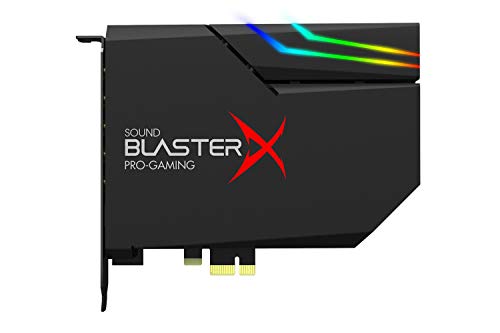
The Creative Sound BlasterX AE-5 Plus is the most capable music card in this guide, built around a SABRE32-class converter that plays back at 32-bit and 384 kHz with a stated signal-to-noise ratio of up to 122 dB. Its Xamp discrete headphone bi-amplifier drives each earcup separately and supports headphones up to 600 ohms, including high-end planar-magnetic models. Dolby Digital Live and DTS encoding carry 5.1 discrete and 7.1 virtual surround to an external receiver, and RGB lighting strips are included for a showcase build. It suits a listener whose main habit is serious headphone listening at a desktop.
Watch out for: The card takes a full-height PCIe slot and draws on software for its surround features, so confirm the slot and the Windows driver support on the listing before ordering.
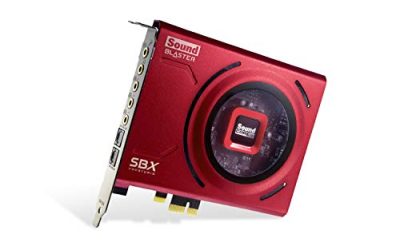
Creative Sound Blaster Z SE
- Best for: Listeners who want one card for music, films, and a small surround speaker set.
- 24-bit/192 kHz playback
- Signal-to-noise ratio of 116 dB
- Headphone amplifier supports headphones up to 600 ohms
- Discrete 5.1 and virtual 7.1 surround sound
Listeners who want one card for music, films, and a small surround speaker set.
The 24-bit converter is a step below the 32-bit card above, so if your library is mostly high-resolution files and you listen on demanding headphones, the AE-5 Plus is the better match.
The Creative Sound Blaster Z SE is the balanced pick for a listener who splits time between music and films. Its converter runs at 24-bit and 192 kHz with a stated 116 dB signal-to-noise ratio, and its headphone amplifier supports headphones up to 600 ohms. Discrete 5.1 and virtual 7.1 output, plus Dolby Digital Live and DTS support, make it a natural fit for a small surround speaker set as well as a good pair of headphones. ASIO support is listed for low-latency playback, which helps when music software needs a clean, direct path to the card.
Watch out for: The 24-bit converter is a step below the 32-bit card above, so if your library is mostly high-resolution files and you listen on demanding headphones, the AE-5 Plus is the better match.
ASUS Xonar SE
- Best for: A first sound card upgrade in a slim or standard desktop.
- 5.1 channel, 192 kHz/24-bit high-resolution audio
- Signal-to-noise ratio of 116 dB
- Built-in 300-ohm headphone amplifier
- Realtek ALC1220X codec
A first sound card upgrade in a slim or standard desktop.
The headphone amplifier is rated to 300 ohms, so very demanding high-impedance headphones will sound quieter than they would on either Creative card above.
The ASUS Xonar SE is the straightforward upgrade from onboard audio, offering 5.1-channel, 192 kHz and 24-bit high-resolution output with a stated 116 dB signal-to-noise ratio. A built-in 300-ohm headphone amplifier gives most mid-range headphones more body and bass than a motherboard jack can, and the low-profile PCIe design fits slim desktops as well as standard towers. It suits a listener who wants cleaner music and a surround output for films without learning a large software suite or paying for flagship specifications.
Watch out for: The headphone amplifier is rated to 300 ohms, so very demanding high-impedance headphones will sound quieter than they would on either Creative card above.
Which One Fits Your Situation
You listen mostly on headphones at a desk
Choose the Creative Sound BlasterX AE-5 Plus. Its 32-bit and 384 kHz converter and the Xamp bi-amplifier give demanding headphones the detail and power they need, and the 122 dB signal-to-noise ratio keeps quiet passages free of hiss. It is the card to buy when headphones are your main way of hearing music.
You want one card for music and films
Choose the Creative Sound Blaster Z SE. Its discrete 5.1 output and Dolby Digital Live support feed a surround speaker set for films, while the 600-ohm headphone amplifier covers serious listening sessions. It is the most flexible of the three for a living-room or bedroom desktop that does everything, from albums to movies.
You are upgrading a slim desktop on a modest plan
Choose the ASUS Xonar SE. The low-profile PCIe card fits cases the taller cards cannot, and its 5.1-channel output with a 300-ohm headphone amplifier is a clear step up from onboard audio. It is the simplest install in this guide, with a small software footprint and drivers for the Windows versions most desktops still run.
Your library is mostly high-resolution files
Choose the Creative Sound BlasterX AE-5 Plus. Its 32-bit and 384 kHz playback handles high-resolution recordings at their native depth, and the Xamp amplifier makes the most of the headphones that reveal that detail. The other two cards cover standard and lossless streaming well, but they cap out at 24-bit playback.
Common Mistakes
- Buying a card for its headline resolution while your headphones are too easy to drive to reveal the difference.
- Choosing a full-height card for a slim case without checking the PCIe slot and bracket size.
- Ignoring the headphone impedance rating and pairing demanding headphones with a weak amplifier.
- Paying for 5.1 or 7.1 surround output when you only own a stereo pair of speakers.
- Skipping the driver and operating system check, then finding the card has no software for your version of Windows.
Frequently Asked Questions
Will a sound card make my music sound better than onboard audio?
A dedicated card can sound cleaner because its converter and amplifier sit on their own board, away from the electrical noise inside a computer case. The improvement is easiest to hear on good headphones or speakers, in quiet passages, and in the bass. If you listen on basic earbuds at low volume, the difference will be small, so match the card to the headphones or speakers you already own.
What is a good signal-to-noise ratio for music listening?
A signal-to-noise ratio near 116 dB is clean enough for most music listening, and 122 dB is quieter still. The figure describes how far the music sits above the background hiss of the card itself. Higher numbers help most with sensitive headphones and quiet recordings, while room noise and speaker quality usually matter more than a few extra decibels.
Do I need a headphone amplifier in a sound card?
You need one if your headphones have high impedance or low sensitivity, since a weak output leaves them quiet and flat. A card rated to 600 ohms covers most demanding headphones, while a 300-ohm rating suits the majority of mid-range models. If you listen on easy-to-drive earbuds or powered speakers, the amplifier rating matters far less than the converter and the connections.
Can an entertainment sound card also handle films and surround sound?
Yes, if the card lists discrete 5.1 output and surround encoding such as Dolby Digital Live or DTS Connect. Those features send surround sound to a speaker set or a receiver over an optical cable, so one card can serve both albums and films. Check the outputs on the listing against the speakers you own, since a stereo setup gains nothing from surround channels.