Our Short List of 3

- Best for: streamers, voice artists and home recordists who want one internal card that handles gaming playback and microphone capture with ASIO support.
- View on Amazon
- Best for: buyers who record line level sources or a 3.5 mm microphone and want specified converters, ASIO support and an optical output in a low profile friendly card.
- View on Amazon
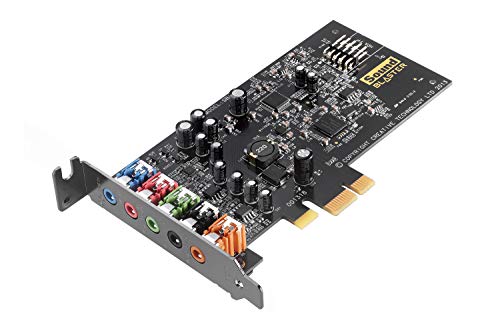
- Best for: voiceover, podcast and commentary recording on slim or older desktops, especially where separate microphone and line inputs remove cable swapping.
- View on Amazon
All 4 Picks at a Glance
| Product | Specs | Action |
|---|---|---|
| 1. Creative Sound Blaster Z SE: the fullest recording feature set |
| Check price on Amazon |
| 2. ASUS Xonar SE: clean conversion and a shared input |
| Check price on Amazon |
| 3. Creative Sound Blaster Audigy Fx: separate inputs on a compact card |
| Check price on Amazon |
 4. Sabrent AU-MMSA: a driverless USB option for laptops |
| Check price on Amazon |
Key takeaways
- Compare four PC sound cards with real recording inputs: PCIe models with ASIO support and clean converters, plus a driverless USB adapter for laptops and calls.
As an Amazon Associate, we earn from qualifying purchases made through links on this page.
If you record voice, instruments or game commentary on a PC, the weakest link is often the audio path built into the motherboard. Onboard inputs sit next to noisy power circuitry, and the result is hiss, hum and thin microphone sound that editing can only partly repair. A dedicated sound card moves conversion onto a purpose built board with a cleaner analog stage, a proper microphone input and, on the better models, ASIO driver support for the low latency monitoring that recording software expects.
This roundup gathers four PC sound cards that can genuinely record, not just play back. Three are internal PCIe cards with analog inputs and converter specifications published by their manufacturers. The fourth is a simple USB adapter for machines with no free expansion slot. Every pick is a sound card in the strict sense: a playback and capture device that installs in or plugs into a PC. Dedicated studio audio interfaces are a different product type, and the buying guide below explains where the line sits and when that other category makes more sense for a recording setup.
What to look for in a sound card for recording
Separate microphone and line inputs. A microphone input carries a preamp because a microphone produces a very low level signal. A line input expects the stronger signal that comes from a mixer, a synthesizer, a game console or a cassette deck being digitized. Cards with separate jacks let a desk microphone and a line source stay connected at the same time. A shared jack saves space on the bracket but forces cable swapping whenever you change source, and plugging a line level source into a microphone input will overload it.
Converter quality on the capture path. Playback figures get most of the attention in product listings, but recording depends on the analog to digital converter, the chip that turns your voice or instrument into data. Look for a named converter and a published signal to noise figure. A higher figure means a quieter noise floor under your recordings, which matters most when a quiet source needs a lot of gain.
ASIO support for low latency. Recording software works with small buffers of audio so you can hear yourself through effects while you track. ASIO is a driver standard that lets the software talk to the card with far less delay than the standard Windows audio path. If you record into a digital audio workstation and monitor through the software, ASIO support is the single feature that most changes how the setup feels to use.
A headphone amplifier for monitoring. Recording means listening while you work. A card with a published headphone output figure, whether stated as supported impedance or as output voltage, will drive studio headphones cleanly enough to judge a take. Weak headphone output from a motherboard often pushes people to raise recording levels for the wrong reasons.
Slot, height and front panel connections. Internal cards here use a PCIe x1 slot, which most desktop boards provide. Slim cases need a low profile bracket, so check whether one is in the box. A front panel audio header lets the jacks on the front of the case keep working through the new card instead of going dead.
Sound card or audio interface? The two categories overlap in purpose but not in connections. An audio interface is an external box that adds XLR inputs, phantom power for condenser microphones, hardware gain knobs and balanced connections. A sound card lives inside the PC, works with 3.5 mm microphones, headsets and line level sources, and adds no box to the desk. If your microphone connects with a 3.5 mm plug, or you record line level sources and game audio, a sound card covers the job. If you plan to use a studio condenser microphone with an XLR cable, choose an interface instead, because none of the cards in this roundup supplies phantom power.
The best PC sound cards for recording
1. Creative Sound Blaster Z SE: the fullest recording feature set
- Best for: streamers, voice artists and home recordists who want one internal card that handles gaming playback and microphone capture with ASIO support.
- View on Amazon
streamers, voice artists and home recordists who want one internal card that handles gaming playback and microphone capture with ASIO support.
The Sound Blaster Z SE is the pick that treats recording as a primary job rather than an afterthought. Creative publishes a signal to noise figure of 116 dB for the card and confirms ASIO support, describing it as providing low latency, high fidelity audio even for recordings. That combination is rare in this category: most internal cards publish playback numbers and say little about the capture path. The Z SE also includes microphone EQ and voice processing inside the Sound Blaster Command software, so a streamer or voice artist can shape a microphone before the signal reaches the recording or broadcasting application.
Playback hardware is equally complete. The card drives discrete 5.1 speaker systems, produces virtual 7.1 surround for headphones, and carries a headphone amplifier that handles headphones of up to 600 ohms, which covers demanding studio models. Pre tuned headphone EQ profiles are included for a range of headsets, and the software lets you switch between headphones and speakers without moving cables. Conversion runs at up to 24 bit and 192 kHz.
The limitations follow from the format. The microphone input is a 3.5 mm unbalanced jack, so there is no XLR connection and no phantom power for studio condenser microphones. The card is a full height design with a red shroud, which will not suit every build or every slim case. Sound Blaster Command runs on Windows only, so the processing features are unavailable on other systems, although the card itself still passes audio.
2. ASUS Xonar SE: clean conversion and a shared input
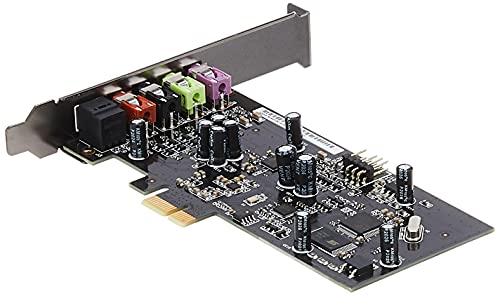
- Best for: buyers who record line level sources or a 3.5 mm microphone and want specified converters, ASIO support and an optical output in a low profile friendly card.
- View on Amazon
buyers who record line level sources or a 3.5 mm microphone and want specified converters, ASIO support and an optical output in a low profile friendly card.
The Xonar SE takes a quieter approach: strong published conversion figures and very little software theatre. ASUS lists a signal to noise figure of 116 dB and names the converter chips on the board, a Realtek S1220A handling both digital to analog playback and the analog to digital capture path, behind a Cmedia 6620A audio processor. Because the capture converter is specified rather than left anonymous, this is one of the more credible internal cards for digitizing line level sources such as vinyl playback chains, mixers and older hardware. ASUS also lists ASIO support, which keeps the card usable with digital audio workstation software at low latency.
Connections cover the essentials. There are three 3.5 mm outputs for 5.1 speaker systems, one optical S/PDIF output for sending digital audio to an external receiver or DAC, a front panel audio header, and a single 3.5 mm jack that works as either line in or microphone in. Headphone output is rated at 2 Vrms, enough for typical studio and gaming headphones. A low profile bracket is included in the box, so the card fits slim desktop cases as well as full towers. Playback and recording run at up to 192 kHz and 24 bit.
The shared input jack is the main compromise. A microphone and a line source cannot stay connected at the same time, so anyone who switches between voice work and digitizing will swap cables often. Analog output stops at 5.1, with no discrete 7.1 option. The ASUS control software is functional but plain, with none of the microphone processing polish of the Creative card above.
3. Creative Sound Blaster Audigy Fx: separate inputs on a compact card
- Best for: voiceover, podcast and commentary recording on slim or older desktops, especially where separate microphone and line inputs remove cable swapping.
- View on Amazon
voiceover, podcast and commentary recording on slim or older desktops, especially where separate microphone and line inputs remove cable swapping.
The Audigy Fx is the veteran design in this group, and its layout explains its staying power. Unlike the Xonar SE, it provides separate microphone input and line input jacks, so a desk microphone and a line level source can both remain plugged in. For a simple voiceover or podcast desk where a microphone and a phone, mixer or instrument source take turns, that small detail removes daily friction. The card is a compact half height PCIe design that suits slim office desktops, and it still feeds a discrete 5.1 speaker system.
Published figures are a step below the two cards above: conversion runs at up to 24 bit and 192 kHz with a signal to noise figure of 106 dB. In practice that means a slightly higher noise floor on quiet recordings, which matters for soft spoken voice work and matters less for commentary recorded close to the microphone. The card includes a headphone amplifier and Creative’s SBX processing through the Audigy Fx control panel, plus a front panel header so case jacks stay live.
The clearest limitation is driver support for recording software. Creative does not list ASIO support for this model, so latency in a digital audio workstation depends on generic driver paths and will be higher than on the Z SE or Xonar SE. The control panel software is also an older design. Treat this card as a clean, convenient input upgrade over motherboard audio rather than a low latency studio tool.
4. Sabrent AU-MMSA: a driverless USB option for laptops
- Best for: laptop users who need a working microphone input for calls, dictation, voice notes and basic narration, with zero setup.
- View on Amazon
laptop users who need a working microphone input for calls, dictation, voice notes and basic narration, with zero setup.
The AU-MMSA is not a card at all but a small USB adapter, included because many recording problems happen on laptops and compact PCs with no expansion slot and a damaged or noisy onboard microphone jack. It provides one stereo output jack and one mono microphone input jack on a USB Type-A connector. Sabrent builds it to the USB Audio Device Class 1.0 specification, so it works without any driver installation on Windows and Mac systems, and it draws power from the USB port.
For speech, the setup is genuinely useful. A headset or 3.5 mm microphone plugged into the adapter bypasses a faulty onboard input, levels are handled by the system volume controls, and the adapter can stay in a laptop bag as a permanent spare audio port. It is also a simple way to add a microphone input to a machine that shipped with only a combined headset jack of poor quality.
The limits are firm. The microphone channel is mono and the conversion is basic, built for intelligible speech rather than music capture, and Sabrent publishes no signal to noise figure for it. There is no ASIO support, no headphone amplifier specification and no separate line input, so line level sources will overload the microphone jack. Anyone recording music or voice at production quality should choose one of the internal cards above, or an audio interface.
Comparison table
| Sound card | Connection | Speaker output | Published SNR | Recording input | ASIO |
|---|---|---|---|---|---|
| Creative Sound Blaster Z SE | PCIe x1 | 5.1 discrete | 116 dB | 3.5 mm microphone in | Yes |
| ASUS Xonar SE | PCIe x1 | 5.1 | 116 dB | Shared line in / mic in | Yes |
| Creative Sound Blaster Audigy Fx | PCIe x1 | 5.1 | 106 dB | Separate mic in and line in | No |
| Sabrent AU-MMSA | USB Type-A | Stereo | Not published | Mono microphone in | No |
Frequently asked questions
Can I use a studio condenser microphone with these cards?
Not directly. Condenser microphones with XLR cables need phantom power, and none of these products provides an XLR input or phantom power. Dynamic microphones and any microphone with a 3.5 mm plug work fine. If a condenser microphone is in your plans, that is the point where an external audio interface becomes the right product type.
Why does ASIO support matter for recording?
ASIO lets recording software exchange audio with the card in small buffers, so the delay between speaking and hearing yourself through effects stays short enough to ignore. Without it, monitoring through the software can lag noticeably, and most people end up recording dry and adding effects later. Two cards here, the Sound Blaster Z SE and the Xonar SE, list ASIO support from their manufacturers.
What is the difference between the microphone in and line in jacks?
They expect different signal levels. A microphone produces a faint signal, so the microphone input adds preamp gain. A line input expects the stronger, already amplified signal from a mixer, keyboard or media player. A line source plugged into a microphone input will distort, and a microphone plugged into a line input will record far too quietly.
Will a sound card remove hiss from my recordings?
It lowers one source of it. A dedicated card moves conversion away from motherboard circuitry and, on the models with published figures above 110 dB, keeps the electronic noise floor well under the recording. Room noise, microphone placement and gain settings still decide most of what a listener hears, so a quieter card cannot rescue a microphone placed across the room.
My PC has no free PCIe slot. What are my options?
The Sabrent AU-MMSA adds a microphone input and headphone output over USB with no installation at all, which solves basic voice capture on laptops and compact systems. For music recording on such a machine, the realistic step up is an external audio interface rather than another adapter, since interfaces add proper microphone preamps and gain controls in the same USB form.
Conclusion
For most people recording on a desktop PC, the Sound Blaster Z SE is the most complete answer: published capture friendly figures, ASIO support and microphone processing in one internal card. The Xonar SE matches its headline conversion figure, adds an optical output and suits slim cases, at the cost of a shared input jack. The Audigy Fx remains the convenient choice where separate microphone and line inputs matter more than the last word in noise floor, and the Sabrent AU-MMSA covers laptops and slot free machines for speech. Match the card to the microphone you actually own and the software you record into, and any of the four is a clear step up from motherboard audio.