Our Short List of 3
All 4 Picks at a Glance
| Product | Specs | Action |
|---|---|---|
 Cooler Master NR200 | Check price on Amazon | |
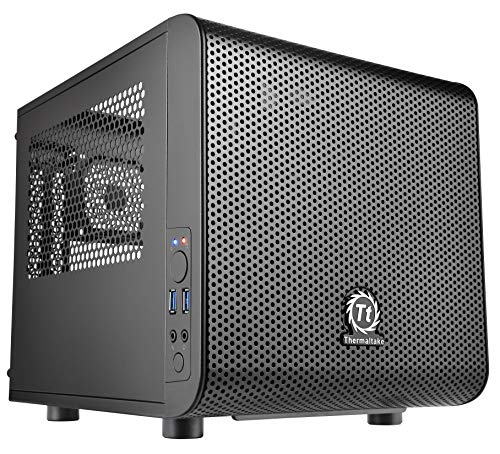 Thermaltake Core V1 | Check price on Amazon | |
 Cooler Master MasterBox Q300L | Check price on Amazon | |
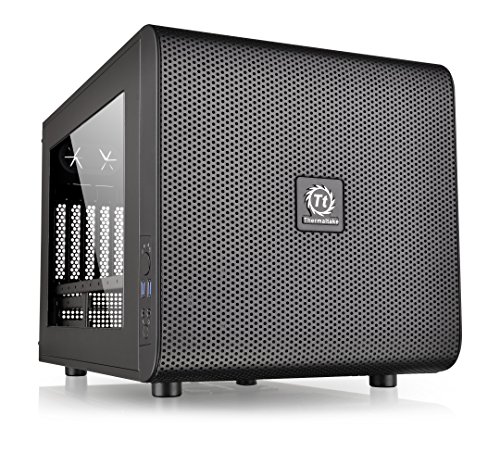 Thermaltake Core V21 | Check price on Amazon |
Key takeaways
- Find the best cases for a Mini ATX motherboard, from compact Mini-ITX cubes to Micro-ATX towers, with cooling, GPU clearance and build guidance.
Choosing a case for a small motherboard is one of the most satisfying parts of a compact PC build, because the right chassis turns a tiny board into a tidy, capable machine that fits on a desk or in a living room. The phrase Mini ATX is often used loosely by builders to describe small boards, and in practice it usually points to two real standards: Mini-ITX, the smallest common desktop board size, and Micro-ATX, a slightly larger board that still fits in compact towers and cubes.
A small case does more than save space. It shapes airflow, limits the size of the graphics card and CPU cooler you can install, and decides how easy the build is to assemble and upgrade later. A case built for a Mini-ITX board alone will not accept a Micro-ATX board, no matter how much room seems left inside. This guide compares five cases that cover the most useful layouts, from an 18 liter Mini-ITX chassis to a stackable Micro-ATX cube.
As an Amazon Associate, we earn from qualifying purchases.
How to Choose a Case for a Mini ATX Motherboard
Start by confirming the exact form factor of your motherboard, because this single detail decides which cases are even possible. A Mini-ITX board measures 170 by 170 millimeters, while a Micro-ATX board measures up to 244 by 244 millimeters and needs a wider tray. A case listed for Mini-ITX only will not take a Micro-ATX board, but a case listed for Micro-ATX will almost always accept a Mini-ITX board as well.
Next, measure the three components that most often cause trouble in small cases: the graphics card, the CPU cooler, and the power supply. Graphics card length is the usual limit in compact chassis, so compare the length printed on the card against the maximum GPU length in the case specifications. CPU cooler height matters just as much, because a tall tower cooler can press against a side panel. Power supply form factor is the third check: many Mini-ITX cases require a compact SFX or SFX-L unit, while most Micro-ATX cases accept a standard ATX power supply.
Cooling layout deserves attention before the build begins. Small cases rely on a clear path for air, so look at how many fans the case includes, where they mount, and whether the panels are vented, mesh, or solid. Liquid cooling support is also worth checking if you plan to use an all-in-one cooler, since radiator size and mounting position vary a lot between compact cases.
Storage and expansion needs come next. If you plan to install several hard drives for a home server or media library, a case with multiple drive bays and a modular interior is more useful than a minimalist gaming chassis with a single drive mount. Count the expansion slots too, since a Mini-ITX board has a single slot and a Micro-ATX board usually has four, and the case must match.
Finally, think about where the finished PC will live. A cube case sits well on a shelf or beside a television, a slim tower tucks under a desk, and a case with a tempered glass or acrylic window shows off the components inside. Dust filters matter if the room has pets or carpet, since small cases clog faster than large ones, and tool-free panels and removable dust filters make cleaning and upgrades far easier over the life of the machine.
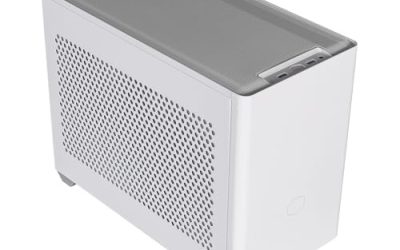
Cooler Master NR200
The Cooler Master NR200 is the most widely recommended Mini-ITX case in this guide, and its reputation rests on a simple idea: pack the cooling and component support of a much larger case into an 18 liter chassis. It accepts a Mini-ITX motherboard only, so it suits builders who have already chosen that board size and want the smallest footprint that still takes a full length graphics card. Two side panel options come in the box, one vented steel panel for maximum airflow and one tempered glass panel for showing off the build.
Cooling is the NR200 strongest suit. The case supports graphics cards up to 330 millimeters long and radiators up to 280 millimeters, with room for up to six 120 millimeter fans. A vertical graphics card mount is included, along with a riser cable. The power supply must be an SFX or SFX-L unit, which is the main trade-off of the compact layout, and CPU cooler clearance reaches 155 millimeters.
For a desk build, a living room PC, or a portable gaming machine, the NR200 is a strong default choice.
Who It Suits
The NR200 suits builders who want a compact Mini-ITX gaming or workstation PC with strong cooling and a full length graphics card. It is less suited to builders who own a Micro-ATX board, since it accepts Mini-ITX only.
Thermaltake Core V1
The Thermaltake Core V1 is a compact cube case built around a Mini-ITX motherboard, and its shape makes it easy to place on a desk, a shelf, or beside a television. The cube layout puts the motherboard flat, with the graphics card mounted above it, which keeps the build short and wide rather than tall and narrow. Interchangeable side panels let you choose between a windowed view and a vented panel for extra airflow, and the 200 millimeter fan pre-installed on the front panel moves a large volume of air through the small interior.
Inside, the Core V1 supports graphics cards up to 260 millimeters long and CPU coolers up to 140 millimeters tall, which covers many mid-range graphics cards and compact air coolers. A standard ATX power supply fits, so builders can often reuse a power supply they already own. Storage is handled by two 3.5 inch bays and two 2.5 inch bays, enough for a boot drive plus a couple of extra drives for games or media.
The cube shape has practical benefits beyond looks. The motherboard lies flat, so a heavy CPU cooler does not hang sideways from the board, and the wide interior makes cable routing simpler than in a slim tower. It is one of the most affordable ways to build a small, capable Mini-ITX machine.
Who It Suits
The Core V1 suits first-time small form factor builders and anyone who wants an affordable cube case for a Mini-ITX board with a standard power supply. It is less suited to builders with long high-end graphics cards, since GPU clearance stops at 260 millimeters.
Fractal Design Node 304
The Fractal Design Node 304 takes a different approach to the small form factor, trading a glass window for a quiet, storage friendly design that works well as a home server, a media PC, or a discreet desktop machine. Its brushed aluminum front panel gives it a calm, understated look, and the compact cube body measures 250 by 210 by 374 millimeters. Three Silent Series R2 120 millimeter fans come pre-installed, and a built-in fan controller on the front panel lets you adjust their speed without opening the case.
Storage is where the Node 304 stands out. A modular interior with six drive bays holds up to six hard drives or solid state drives, and the drive cages can be removed to make room for a longer graphics card. With the cages in place, the case still accepts graphics cards up to 310 millimeters long, and CPU coolers up to 165 millimeters tall fit comfortably. A standard ATX power supply up to 160 millimeters long is supported.
Dust filters on the front, top, and bottom panels help keep the drives and fans clean, and two USB 3.0 ports and audio jacks are built into the front panel. The case runs quietly for a small chassis, and the modular drive system makes it one of the most flexible Mini-ITX cases for builders who need storage first and gaming second.
Specs
| Feature | Detail |
|---|---|
| Brand | Fractal Design |
| Model | Node 304, FD-CA-NODE-304-BL |
| Motherboard support | Mini-ITX |
| Dimensions | 250 x 210 x 374 mm |
| Maximum GPU length | 310 mm |
| Maximum CPU cooler height | 165 mm |
| Power supply support | ATX up to 160 mm |
| Included fans | Three 120 mm Silent Series R2 fans |
| Drive bays | Six 3.5 inch or 2.5 inch bays, modular |
| ASIN | B009LHF4FO |
Who It Suits
The Node 304 suits builders who need a quiet Mini-ITX case with room for several drives, such as a home server or a media center PC. It is less suited to builders who want a windowed showcase case or a Micro-ATX board.
Cooler Master MasterBox Q300L
The Cooler Master MasterBox Q300L is the most versatile case in this guide, because it is the first here to accept both Micro-ATX and Mini-ITX motherboards, which makes it the natural pick if your board is a Micro-ATX model or if you want the option to switch board sizes later. It is a compact tower rather than a cube, measuring 387 by 230 by 381 millimeters, and its perforated front, top, and bottom panels give it a fully ventilated airflow design.
Component clearance is generous for a case of this size. Graphics cards up to 360 millimeters long fit, CPU coolers up to 159 millimeters tall fit, and power supplies up to 160 millimeters long fit, which covers most mainstream parts without forcing compact alternatives. A 240 millimeter liquid cooler can mount on the front, top, or rear, and the case ships with one 120 millimeter fan pre-installed at the rear.
One of the Q300L most useful features is its modular input and output panel, which can be moved to six different positions around the case, so the front ports can sit at the top, the bottom, or the side depending on where the case lives. The case can also stand vertically or lie horizontally. For builders who want a small case with full Micro-ATX support and room for standard parts, the Q300L is hard to beat.
Who It Suits
The Q300L suits builders with a Micro-ATX board who want a compact tower with room for a long graphics card and a standard power supply. It is less suited to builders who want the smallest possible footprint.
Thermaltake Core V21
The Thermaltake Core V21 is the larger sibling of the Core V1, and it is the case to choose when you want a cube layout with Micro-ATX support. It accepts both Micro-ATX and Mini-ITX motherboards, and its 336 by 320 by 424 millimeter body offers far more room than the V1 while keeping the same stackable cube design. A 200 millimeter fan comes pre-installed on the front panel, and every panel except the acrylic window is vented.
Clearance is generous throughout. Graphics cards up to 350 millimeters long fit, CPU coolers up to 185 millimeters tall fit, and a standard ATX power supply is supported, so most mainstream components install without the compromises that small form factor builds often demand. Five expansion slots match the Micro-ATX board layout, and the case supports radiators in several positions for builders who prefer liquid cooling.
The Core V21 most distinctive feature is its flexibility. The motherboard can be mounted vertically or horizontally, the panels can be rearranged to suit the placement of the case, and the stackable design lets you place a second V21 on top for a matching dual system. Two USB 3.0 ports and audio jacks sit on the front panel. For a builder who likes the cube shape but needs Micro-ATX support and room to grow, the V21 is a strong fit.
Who It Suits
The Core V21 suits builders with a Micro-ATX board who want a cube case with generous clearance, flexible motherboard orientation, and a stackable design. It is less suited to builders who need the smallest possible case.
Frequently Asked Questions
What does Mini ATX mean when shopping for a PC case?
Mini ATX is not a single official standard, and in listings and guides it is usually used as shorthand for small boards, most often Mini-ITX and sometimes Micro-ATX. Before you buy a case, check whether your board is Mini-ITX at 170 by 170 millimeters or Micro-ATX at up to 244 by 244 millimeters, then confirm the case specifications list that exact form factor.
Can a Mini-ITX case fit a full length graphics card?
Some Mini-ITX cases can, but it depends on the case. The Cooler Master NR200 in this guide accepts graphics cards up to 330 millimeters long, and the Fractal Design Node 304 accepts cards up to 310 millimeters, while the Thermaltake Core V1 stops at 260 millimeters. Always compare the length printed on your graphics card against the maximum GPU length in the case specifications.
Do small cases need a special power supply?
It depends on the case. Many Mini-ITX cases, including the NR200, require a compact SFX or SFX-L power supply, while most Micro-ATX cases and some Mini-ITX cubes, such as the Thermaltake Core V1 and Core V21, accept a standard ATX power supply. Check the power supply form factor line in the case specifications before ordering.
Is a cube case or a tower case better for a small motherboard?
Neither shape is better in every build, and the right choice depends on where the PC will live and which components you own. A cube case such as the Core V1 or Core V21 sits low and wide, keeps the motherboard flat, and often cools well with a large front fan, which suits a desk shelf or a living room. A tower case such as the Q300L takes up less desk width and fits neatly under a desk.
Final Verdict
The best case for a Mini ATX motherboard depends on the board you own and the parts you plan to install, but the five cases in this guide cover the most useful combinations. The Cooler Master NR200 is the best overall pick for a Mini-ITX gaming build, thanks to its 18 liter size, 330 millimeter graphics card clearance, and strong cooling support. The Cooler Master MasterBox Q300L is the best pick for a Micro-ATX board, because it accepts both Micro-ATX and Mini-ITX boards and fits a 360 millimeter graphics card.
For a quiet, storage heavy build, the Fractal Design Node 304 is the standout, with six modular drive bays and three quiet fans in a discreet cube. For an affordable first small form factor build, the Thermaltake Core V1 offers a simple cube layout with a large front fan and a standard power supply. And for builders who want a cube with Micro-ATX support and room to grow, the Thermaltake Core V21 rounds out the list with generous clearance and a stackable design.
Product and ASIN Reference
| Product | ASIN |
|---|---|
| Cooler Master NR200 | B08BFJHP26 |
| Thermaltake Core V1 | B00M2UKGSM |
| Fractal Design Node 304 | B009LHF4FO |
| Cooler Master MasterBox Q300L | B0785GRMPG |
| Thermaltake Core V21 | B00PDDMN6S |